
The scheduling problem
Youth sports scheduling is more than creating matchups
A basic schedule generator can create a round-robin list of opponents. The harder problem begins when games and practices must be assigned to actual fields and times.
Administrators may need to coordinate dozens of teams across a limited number of playing spaces. Some fields are available only on particular days. Teams may require multiple weekly sessions, prefer different time windows, or be unavailable at certain times. Multiple divisions may compete for the same high-demand evening hours.
Even after the initial schedule is approved, fields close, games are cancelled, and practices must be moved. A schedule that worked at the start of the season must continue to work as circumstances change. FieldDAI is designed around that operational reality.
A clear definition
What is youth sports scheduling software?
Youth sports scheduling software helps clubs and leagues coordinate teams, games, practices, facilities, and available time slots in one scheduling process. FieldDAI extends that process with preferences, conflict checks, draft review, diagnostics, schedule locking, publishing, exports, and in-season management.
Current capabilities
Build schedules around teams, fields, and availability
Team scheduling preferences
Represent how often teams need to play or practice, along with the days and times that work for them.
Facility and space availability
Maintain an inventory of fields, courts, and other playing spaces, then define when each space can be scheduled.
Draft schedule generation
Generate a working schedule from organizational requirements instead of reconciling every assignment by hand.
Conflict detection
Check for overlapping team and playing-space assignments before the schedule is approved.
Schedule diagnostics
See unmet demand, constrained time windows, and capacity limitations that require administrative attention.
In-season management
Use a structured workflow to manage cancellations, schedule changes, and rescheduling during the season.
A reviewable draft
Generate a schedule without surrendering administrative control
FieldDAI uses team requirements, scheduling preferences, facility information, and available time windows to generate a draft schedule.
The draft is not treated as an unquestionable final answer.
Administrators can review proposed assignments, examine the results, and decide what should be accepted or adjusted.
- 1
Import or enter teams, facilities, playing spaces, and scheduling preferences.
- 2
Define when each field, court, or other space is available.
- 3
Generate a draft schedule based on those requirements and constraints.
- 4
Review proposed assignments and scheduling diagnostics.
- 5
Lock accepted assignments while continuing to work on the remainder.
- 6
Approve, publish, and export the completed schedule.
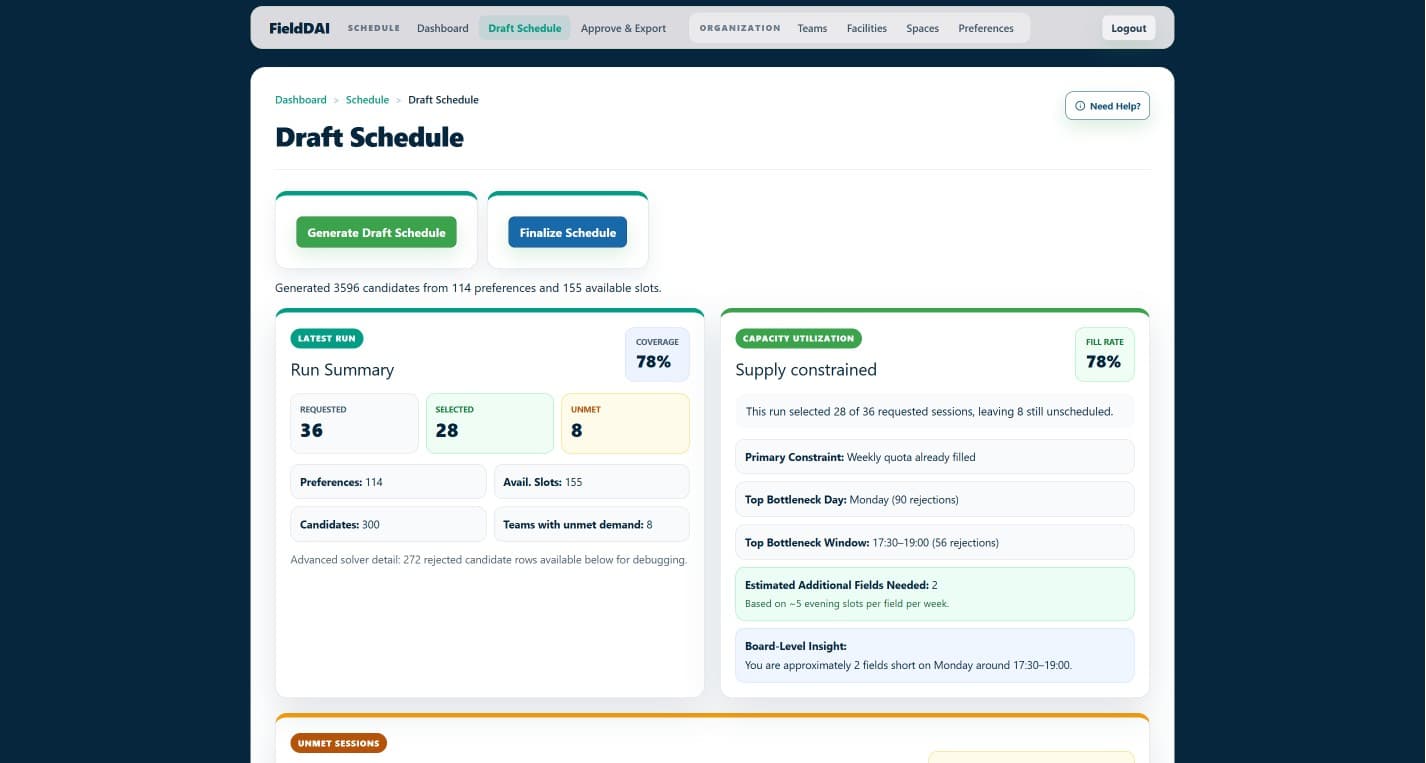
Scheduling diagnostics
Understand what the schedule could not accommodate
If an organization requests more sessions than its fields and available hours can support, the scheduling system should make that limitation visible.
Otherwise, administrators may receive an incomplete schedule without understanding why teams were left short. FieldDAI helps administrators evaluate requested sessions, scheduled sessions, unmet demand, available capacity, high-demand time windows, and constraints that may be limiting the result.
Are there enough fields to meet the requested schedule?
Is unmet demand concentrated on one evening?
Are team preferences restricting otherwise available capacity?
Would additional facility hours materially improve the schedule?
FieldDAI does not assume that every scheduling problem has one simple cause. It gives administrators better visibility into where requests, preferences, and available capacity are not aligning.
Keep what works
Lock accepted assignments while revising the rest
Reworking a schedule should not require discarding every assignment that already works. FieldDAI allows administrators to lock individual assignments or lock accepted assignments in place while the remaining schedule is regenerated or revised.
Manage Season
Continue managing the schedule after publication
Weather, facility closures, school events, and other disruptions can force organizations to cancel or move events. FieldDAI's Manage Season workflow supports cancellation and rescheduling tasks without promising that software can automatically resolve every disruption.
Publish and export
Make the approved schedule usable outside FieldDAI
Organizations can publish public schedules through shareable links, export schedule information in CSV format, and make schedules available through calendar-compatible ICS feeds.
Public schedules give teams and families a direct way to view the approved schedule without turning FieldDAI into a complete team website or communications platform. CSV and ICS options also allow organizations to use schedule information alongside their existing tools.
A focused scheduling layer
Your organization should not have to replace the systems it already uses just to improve scheduling.
Many youth sports organizations already have systems for registration, payments, rosters, websites, and team communication. FieldDAI focuses on coordinating teams, preferences, facilities, availability, conflicts, diagnostics, and schedule changes.
Organizations can export FieldDAI schedule information for use alongside their existing sports-management tools. FieldDAI does not currently claim direct platform-specific integrations with TeamSnap, SportsEngine, Sports Connect, or similar products.
Choosing the right tool
When you need more than a basic schedule generator
| Basic schedule generator | Specialized scheduling layer |
|---|---|
| Creates basic matchups or time assignments | Coordinates teams, preferences, facilities, and availability |
| Often assumes relatively uniform availability | Represents availability for individual playing spaces |
| Primarily focused on initial creation | Supports draft review and in-season management |
| May require regenerating the complete schedule | Preserves locked assignments while the remainder is revised |
| Shows the resulting schedule | Provides visibility into unmet demand and constraints |
Initial focus
Built initially around youth soccer scheduling
FieldDAI's initial development and testing have centered on youth soccer clubs and leagues, where organizations frequently coordinate many teams across limited fields and high-demand time windows.
Its scheduling model is also intended for youth sports organizations coordinating teams across constrained fields, courts, and other playing spaces. Extensive validation across every sport and competition format has not yet been completed.
FieldDAI is a Pittsburgh-based platform being developed for youth sports organizations nationally.
Import and manage authoritative schedules created elsewhere
Some clubs receive an authoritative game schedule from a league, governing body, or another system and must then assign local fields, manage changes, and coordinate the resulting events.
FieldDAI is being expanded to import those schedules, preserve their games as authoritative events, assign and manage local fields, and support cancellation and rescheduling workflows. This capability is actively in development and is not yet available as a production feature.
Common questions
Youth sports scheduling software FAQ
What is youth sports scheduling software?
Youth sports scheduling software helps clubs and leagues coordinate teams, games, practices, facilities, and available time slots. More capable systems can also account for preferences, detect conflicts, identify unmet demand, publish schedules, and support in-season changes.
Can FieldDAI schedule both games and practices?
Yes. FieldDAI supports multiple event types, including games and practices, allowing organizations to manage different scheduling needs within the same workflow.
Can FieldDAI account for team preferences?
Yes. Organizations can record team scheduling preferences and incorporate them into draft schedule generation. Those preferences are evaluated alongside field availability, competing demand, and other constraints.
What happens when there are not enough available fields?
FieldDAI can show how many requested sessions were scheduled, how much demand remains unmet, and where capacity or scheduling constraints may be limiting the result. Administrators can then adjust availability, revise preferences, or make informed decisions about unresolved demand.
Can administrators preserve part of a schedule while revising the rest?
Yes. FieldDAI allows accepted assignments to be locked in place while administrators continue working on the unresolved portion of the schedule.
Does FieldDAI support cancellations and rescheduling?
Yes. FieldDAI's Manage Season workflow supports cancellation and rescheduling tasks as part of ongoing schedule management. It does not promise that every disruption can be resolved automatically.
Can organizations publish and export their schedules?
Yes. FieldDAI supports public schedule sharing, CSV exports, and calendar-compatible ICS feeds. FieldDAI is not intended to replace an organization's complete website or communications platform.
Does FieldDAI replace TeamSnap, SportsEngine, or Sports Connect?
No. FieldDAI is designed as a specialized scheduling and operations layer. Organizations can continue using existing systems for registration, payments, rosters, and communication. FieldDAI currently supports generic CSV and ICS exports but does not claim direct platform-specific integrations.
Can FieldDAI manage a schedule created by another system?
This capability is in development. FieldDAI is being expanded to import authoritative schedules created by leagues or other systems and support field assignment, cancellation, rescheduling, and ongoing management of those events.
See FieldDAI in action
See whether FieldDAI fits your scheduling process
If your organization is coordinating team requests, limited field availability, conflicts, and in-season changes through spreadsheets or general-purpose sports software, request a walkthrough of FieldDAI's focused scheduling workflow.